Merchant fiat destination
OpenRampKit is not only for crypto apps. With a merchant destination, the user pays in local currency and the money lands in your own account at a payment provider. There is no crypto in the flow.
This guide uses the Xendit adapter: QRIS, QR Ph, PromptPay and PayNow QR codes, and e-wallets such as GCash, DANA, OVO, ShopeePay, MoMo and ZaloPay.
| Methods (Indonesia, dark theme) | QRIS payment |
|---|---|
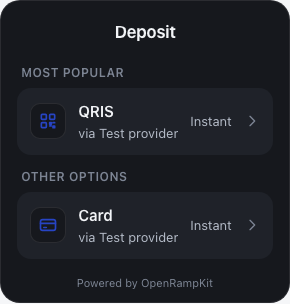 | 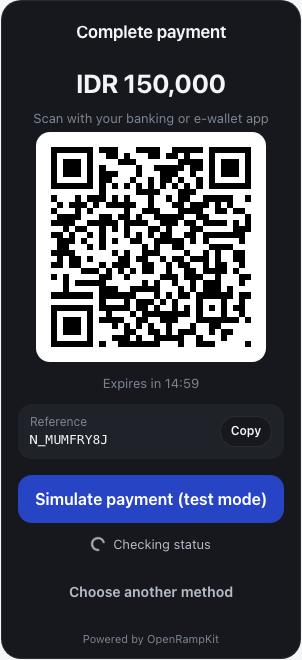 |
1. Configure Xendit
import { createOpenRamp } from '@openrampkit/server'
import { xendit } from '@openrampkit/adapter-xendit'

export const openramp = createOpenRamp({
  secret: process.env.OPENRAMP_SECRET!,
  baseUrl: 'https://app.example.com/api/openramp',
  adapters: [
    xendit({
      secretKey: process.env.XENDIT_SECRET_KEY!, // xnd_development_... or xnd_production_...
      webhookToken: process.env.XENDIT_WEBHOOK_TOKEN!, // Dashboard > Settings > Webhooks
    }),
  ],
  webhooks: { url: 'https://app.example.com/api/hooks', secret: process.env.OPENRAMP_WEBHOOK_SECRET! },
})
In the Xendit dashboard, set the payment webhook URL to:
https://app.example.com/api/openramp/webhooks/xenditThe adapter checks the x-callback-token header against webhookToken.
2. Create a merchant session
const { clientSecret } = await openramp.sessions.create({
  userId: user.id,
  country: 'ID', // the user's country
  destination: { type: 'merchant', currency: 'IDR' },
  metadata: { orderId: order.id },
})
The destination currency is the payment currency. Each Xendit leg accepts one country and one currency, so the session needs both:
| Country | Currency | Methods (Xendit) |
|---|---|---|
ID | IDR | qris, dana, ovo, shopeepay |
PH | PHP | qrph, gcash, maya, grabpay |
TH | THB | promptpay, truemoney |
MY | MYR | touchngo, grabpay |
VN | VND | momo, zalopay |
SG | SGD | paynow |
A user in another country sees the methods as "Not available" (REGION_UNSUPPORTED). Use accountRef on the destination if you route to more than one merchant account: { type: 'merchant', currency: 'IDR', accountRef: 'store-42' }. The planner copies it to the endpoint; adapters may read it from ctx.destination.
3. Open the modal
Nothing changes in the browser. Use DepositButton, OpenRampEmbedded or openDeposit() as usual. For merchant sessions:
- The "Use Crypto" tab is hidden. The modal opens on "Use Cash".
- The method order comes from the country's default priority, for example QRIS first in Indonesia.
- The title says "Deposit" by default. For checkout-like flows, set
appearance.title,appearance.merchantNameandappearance.logoUrl(see Theming).
4. What the user sees
- The user picks a method and enters an amount. The adapter checks the channel's minimum and maximum.
- The quote shows the amount, the fee (if you configured
fees) and the net amount. - On confirm, the adapter creates a Xendit payment request. QR channels show a
QRsurface with a 15-minute countdown. E-wallets show aREDIRECT(web checkout) or aDEEPLINK(open the app). - Xendit sends a webhook when the payment succeeds or fails. The server also polls Xendit while the modal is open.
- The modal shows "Deposit complete". Your backend receives
session.succeeded.
5. Credit the order
Handle session.succeeded in your webhook route. The event carries your metadata, so you can find the order:
if (event.type === 'session.succeeded') {
  const { session, userId, metadata } = event.data.object
  await markOrderPaid(metadata.orderId, { sessionId: session.id, userId })
}
session.result has the amounts. result.input is the amount the user paid. The Xendit webhook does not report an output amount, so result.output is the quoted net amount (after the fee model of the adapter) and result.outputConfirmed is false. No output is reported, so result.delivery is absent. Compare result.input with the expected amount on your order. session.payment.legs[0].providerRef is the Xendit payment request id, for Xendit support. Your net settlement is in the Xendit dashboard. See Webhooks to your backend.
Fees in quotes
Xendit does not return fees in the payment request. To show your real cost in the quote, pass a fee model per method:
xendit({
  secretKey, webhookToken,
  fees: { qris: { bps: 70 }, gcash: { bps: 230 }, ovo: { bps: 150, fixed: '1000' } },
})
bps is basis points of the amount. fixed is a decimal string in the payment currency. The quote's output is the amount minus these fees. The fee is a provider fee in the payment currency, with included: true. Xendit quotes are firm: the amount does not change after the quote.
Test without Xendit
The mock adapter has a payin leg for merchant destinations. It accepts any currency and shows a QR code with a "Simulate payment (test mode)" button:
adapters: [mockAdapter()]
// session: { destination: { type: 'merchant', currency: 'IDR' }, country: 'ID' }
Limits and open items
- Channel limits in the adapter come from Xendit's channel pages.
- VietQR and DuitNow QR are not in the channel list yet. The PayNow QR channel code is marked TO VERIFY in the source.
- The adapter uses one idempotency key per quote (
xendit:{legId}:{nonce}). A retried start for the same quote reuses the first payment request. A new quote (for example after "Try again") creates a new payment request.