Introduction
OpenRampKit is an open-source kit for deposits and withdrawals. It gives your app three things:
- A modal.
<openramp-modal>is a web component (Lit, Shadow DOM). It works in any framework. Thin wrappers for React, Vue, Svelte and Solid are included. - A server you host.
@openrampkit/serveris a singleRequest -> Responsehandler. It holds your provider secrets, plans pathways, runs legs, takes provider webhooks and sends signed webhooks to your backend. - Adapters. Each payment or crypto provider is an adapter, like a wagmi connector. You pass configured adapters to the server. Anyone can write one with
createAdapter()and test it with the conformance kit.
A deposit goes to a destination that your backend picks: a token on a chain (for crypto apps), or your own fiat account at a payment provider (for any app). A withdrawal sends a source asset that your backend picks to a target that the user picks: a wallet address, or their own bank or e-wallet account. See Withdrawals.
Prototype
OpenRampKit is an early release. APIs can change before 1.0.
Concepts in 2 minutes
Learn these words first. The rest of the docs use them.
| Word | Meaning |
|---|---|
| Session | One deposit or one withdrawal for one user. Your backend creates it. It expires after 30 minutes by default. |
| Client secret | A token for one session. The browser gets it from your backend and sends it to the server. It is the only credential in the browser. |
| Destination | Where a deposit goes: a token at an address on a chain, or your own fiat merchant account. Your backend sets it. |
| Source | What a withdrawal sends: an asset, and who holds it (the user's wallet or your treasury). Your backend sets it. |
| Adapter | The code for one provider, for example Relay or Xendit. It runs on your server with your provider keys. |
| Method | How the user pays, for example card, vietqr or transfer. The modal groups pathways by method. |
| Leg | One step at one provider, for example "VietQR to USDC on Base". |
| Pathway | One or two legs in a row that reach the destination. The planner builds them. |
| Quote | The price of a pathway for an amount: what the user pays, the fees and what arrives. |
| Step and surface | What the modal must show now. The surface is the screen part: a QR code, a redirect, a deposit address or a wallet transaction. |
| Webhook | A signed event from the server to your backend, for example session.succeeded. Credit the user only from it. |
| Store and sweep | The store keeps sessions (memory in dev; Durable Objects, KV or Redis in production). The sweep is a scheduled task that retries webhooks and checks open payments. |
Read in this order: this page, then Quick start (Next.js), then Sessions and security and Pathways and legs. Or try the live demo first. It needs no setup.
When to use it
OpenRampKit is not the only way to add deposits. Hosted vendors give you one API key, one contract and a managed backend. See Why OpenRampKit? for how we compare.
| You want | Choose |
|---|---|
| No provider contracts, one bill, the vendor handles provider onboarding | A hosted vendor |
| Your own provider keys, no platform fee, your own server and data | OpenRampKit |
| Local rails in Southeast Asia (QRIS, QR Ph, PromptPay, VietQR, GCash, MoMo) next to cards | OpenRampKit (hosted vendors cover few of these) |
| Fiat into your own merchant account, no crypto at all | OpenRampKit with the Xendit adapter |
| A provider that nobody supports yet | OpenRampKit: write an adapter |
The cost of self-hosting is real. You sign up with each provider, you keep their keys safe, you run a server and a session store, and you configure webhooks. The production checklist lists the work.
Core ideas
The server fixes the destination. Your backend creates a session with openramp.sessions.create({ userId, destination }). The browser gets only a client secret. It cannot change the user, the destination or the address. See Sessions and security.
Pathways, not vendors. A pathway is one or two legs. For example: VietQR at a fiat onramp that buys USDC on Base, then a Relay bridge to a token on Monad. A pure planner builds every pathway that can reach the destination and groups them by payment method. See Pathways and legs.
Server-driven steps. The server tells the modal what to show next as a Step: a state, a surface (a QR code, a redirect, a deposit address, a wallet transaction) and the allowed transitions. The modal has no provider logic. See Flow state machine and Surfaces.
Errors are fields. A failed quote or payment is an OpenRampError with a code, a message that is safe to show, and a recovery hint. The flow does not throw.
Local rails first. The method vocabulary and the default order per country put local QR and e-wallet methods first, where people use them most.
How a deposit works
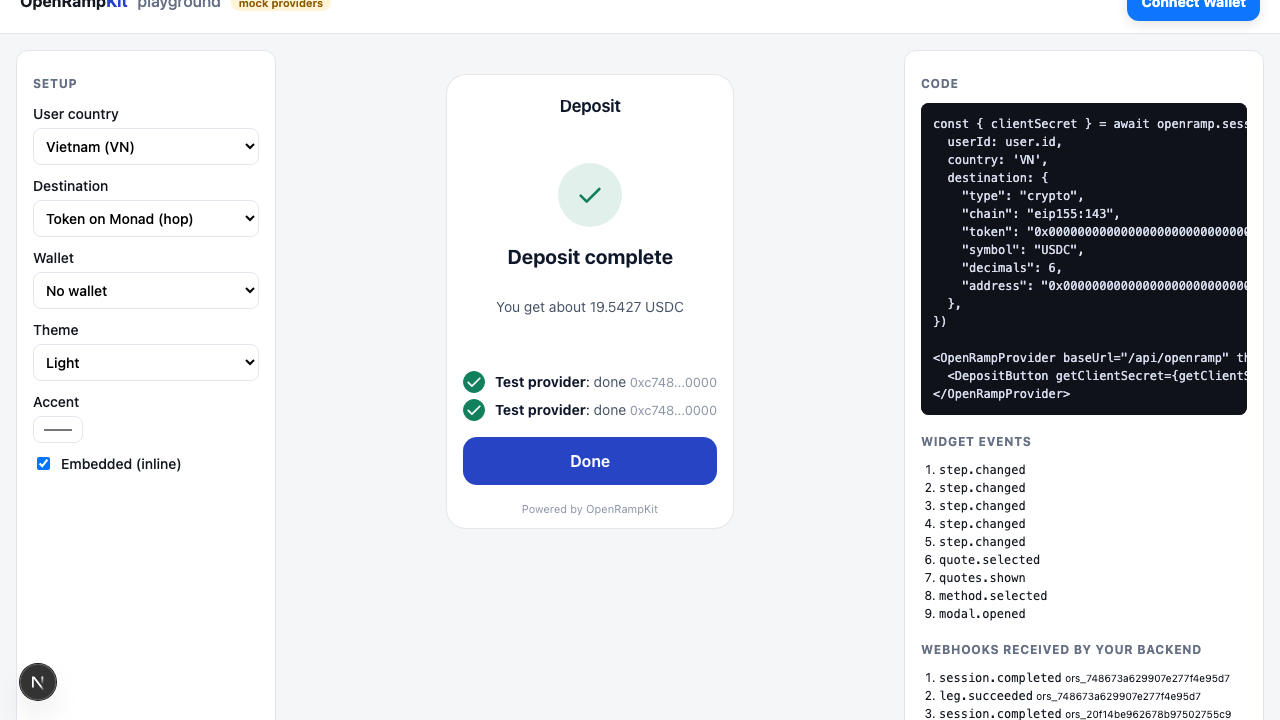
- Your backend creates a session and returns
clientSecretto the browser. - The modal asks the server for a plan. It shows the methods, grouped as Connected, Most popular, Other options and Not available.
- The user picks a method and an amount. The server quotes up to five pathways in parallel and ranks them.
- The user confirms a quote. The server starts the first leg. The modal shows the leg's surface.
- The server learns about progress from provider webhooks and status checks. When all legs succeed, the step is
COMPLETED. - The server sends
session.succeededto your backend. You credit the user.
The Flows page shows each step as a sequence diagram.
How a withdrawal works
- Your backend creates a session with
direction: 'withdraw'and asource(the asset, and who holds it). It returnsclientSecretto the browser. - The user picks a target: a network, a token and an address ("To wallet"), or a payout method ("To cash").
- The user enters an amount and confirms a quote. The server starts the leg.
- The funds leave with a wallet transaction. The user's wallet signs it, or your treasury hook sends it.
- The server sends
session.succeededto your backend.
A background sweep keeps each session moving after the user closes the tab. See Background sweep.
Next steps
- Prerequisites
- Installation
- Quick start (Next.js)
- Withdrawals
- Features: every feature, with links
- Architecture
- Flows: the key flows as sequence diagrams