Surfaces
A surface is what the user must see or do in a step. Adapters return a surface in the action of their LegStep (action.surface, with status: 'requires_action'). The modal draws it. The modal has no provider-specific code: a new provider works in the modal as long as it uses these kinds.
type SurfaceKind = 'REDIRECT' | 'IFRAME' | 'PROVIDER_SDK' | 'QR' | 'DEEPLINK' | 'BANK_FIELDS'
                 | 'DEPOSIT_ADDRESS' | 'WALLET_TX' | 'WALLET_SIGN' | 'OTP' | 'FORM'
Each leg spec lists the surfaces it may use (LegSpec.surfaces). The client tells the server which surfaces it can draw (POST /plan with surfaces). The planner marks legs that need other surfaces as unavailable with CLIENT_UPGRADE_REQUIRED. The web modal draws every kind in SUPPORTED_SURFACES. It adds PROVIDER_SDK only when the app passes providerRenderers (see below).
REDIRECT
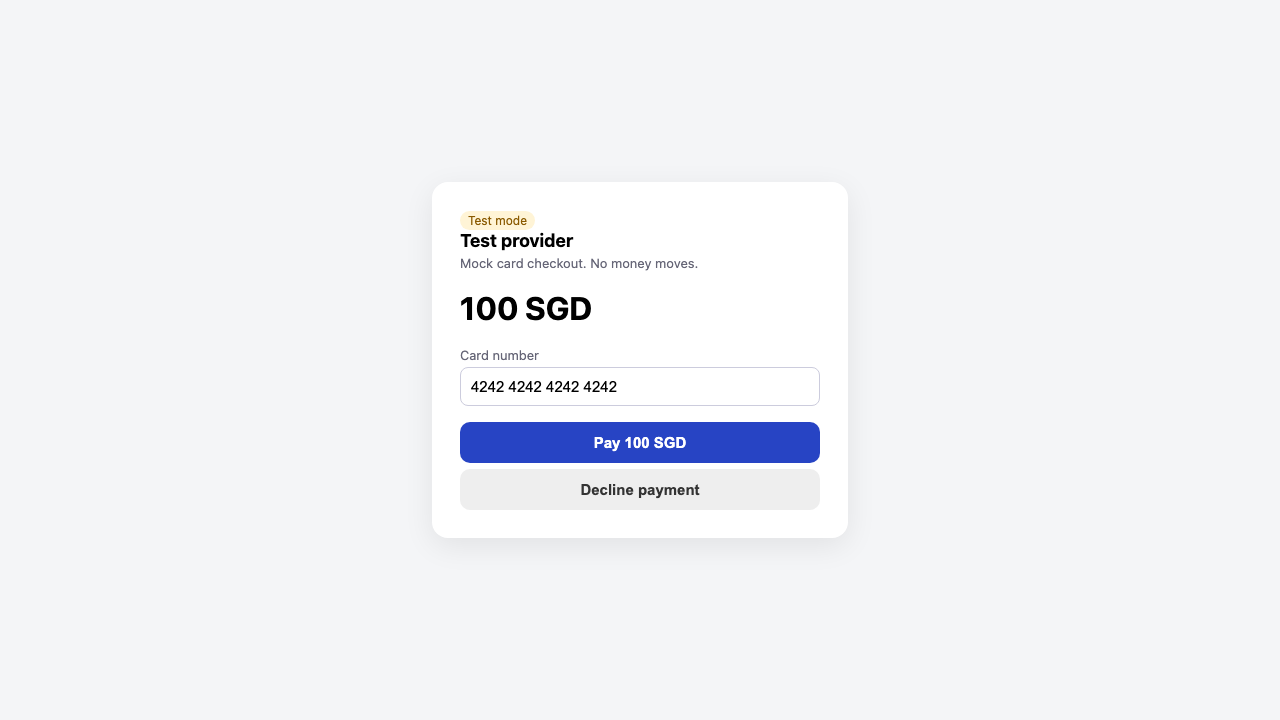
{ kind: 'REDIRECT'; url: string; popup: boolean; provider?: string; keepReferrer?: boolean }A hosted page at the provider: a card checkout, a bank login, an e-wallet web checkout.
- The server replaces
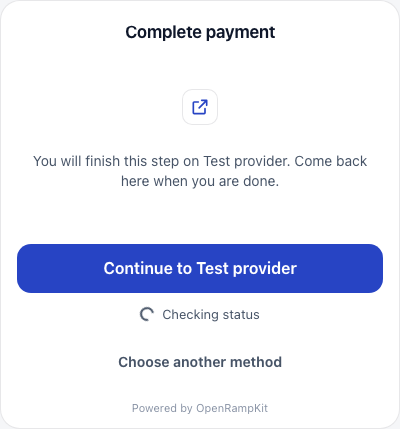
urlwith a signed, popup-safe start URL on your own origin (see Sessions). - The modal shows "You will finish this step on {provider}. Come back here when you are done." and a Continue to {provider} button. The click opens the URL in a new tab, so popup blockers allow it.
- After the click, the text changes to "Waiting for {provider}. Keep this window open." and the button to Open again. If the step has a
SURFACE_RESULTtransition withexpects: 'completed', a Continue button fires it. - The modal keeps polling the step while the user pays in the other tab.
| Redirect | Hosted checkout (mock) |
|---|---|
 |  |
IFRAME
{ kind: 'IFRAME'; url: string; origin: string; allow?: string; height?: number; provider?: string; messages?: IframeMessages }A provider widget inside the modal (Swapped, Transak by default).
- The iframe gets
allow(defaultpayment; camera; microphone; clipboard-write), asandboxthat allows scripts, same origin, forms, popups (which may leave the sandbox) and top navigation on user action, andheight(default 560 px). messagestells the modal how to readpostMessageevents from the widget:
type IframeMessages = {
  origin?: string        // allowed sender origin; default: the surface `origin`
  completed?: string[]   // event types that mean the user finished paying
  failed?: string[]      // event types that mean the payment failed
  closed?: string[]      // event types that mean the user closed the provider page
  typeField?: string     // field of event.data that holds the type; default 'type'
}
The modal also accepts a generic message shape from any widget: { source: 'openramp-embed', type: 'payment.completed' | 'payment.failed' | 'closed' }.
Messages are hints
The modal accepts a message only when event.origin equals the allowed origin exactly and event.source is the modal's own iframe. Even then, a message never sets the outcome. It only makes the client check the server status at once. On closed, the modal shows a notice with Try again (show the widget again) and Choose another method.
PROVIDER_SDK
{ kind: 'PROVIDER_SDK'; provider: string; params: Record<string, unknown> }A step that needs the provider's own browser SDK, for example the Stripe onramp element. The web modal draws it with a provider renderer:
import { openDeposit, stripeOnrampRenderer } from '@openrampkit/web'

openDeposit({
  baseUrl: '/api/openramp',
  clientSecret,
  providerRenderers: { stripe: stripeOnrampRenderer() }, // key: the surface `provider`
})
OpenRampProvider (React, Vue, Solid) and createOpenRamp() (Svelte) take the same providerRenderers option.
- With at least one renderer, the client adds
PROVIDER_SDKto the surfaces it sends toPOST /plan. Without one, the planner shows legs that need only this surface as unavailable (CLIENT_UPGRADE_REQUIRED). - A renderer is
(container, ctx) => void | cleanup.ctxhassurface,mode(lightordark),completed(detail?),failed(detail?)andsubmit(name, inputs?). The modal mounts it once per step (and again whenparams.stepchanges), and calls the cleanup when the step changes. submit(name, inputs?)calls a transition of the session with inputs and resolves to the next step, for a headless provider flow. It rejects with theOpenRampError, which the modal also shows. When a renderer is mounted, the modal shows no buttons for the step'sSUBMITtransitions: the renderer calls them.completed()andfailed()only start a status check. The server status decides the outcome, as for iframe messages.- When no renderer matches the surface
provider, the modal shows a "Continue" link toparams.redirectUrlwhen it is a web URL. Else it shows "This step needs the {provider} SDK". loadScript(src)loads a provider script once per page, in the document head.stripeOnrampRenderer()uses it forSTRIPE_SCRIPTS. Your CSP must allow scripts and frames fromjs.stripe.comandcrypto-js.stripe.com.
QR
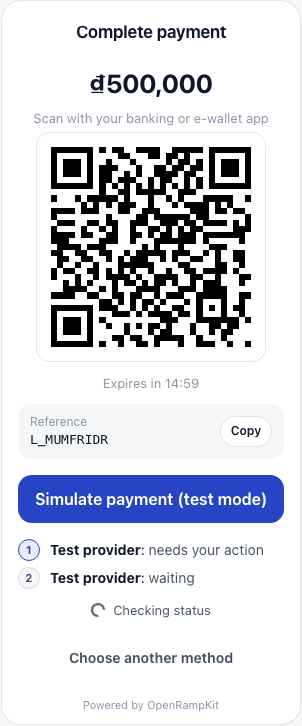
{ kind: 'QR'; payload: string; amount: string; currency: string; reference?: string; method?: string; expiresAt?: string }A payment QR code: QRIS, QR Ph, PromptPay, VietQR, DuitNow, PayNow and so on.
- The modal shows the amount in large text, the method name and "Scan with your banking or e-wallet app", the QR code, a countdown when
expiresAtis set, and thereferencewith a copy button.
DEEPLINK
{ kind: 'DEEPLINK'; url: string; appName: string }Opens an app on the phone, for example an e-wallet. The modal shows an Open {appName} button. It tries a new window first. If the browser blocks it, it navigates the current page to the link.
BANK_FIELDS
{ kind: 'BANK_FIELDS'; fields: Array<{ label: string; value: string; copy: boolean }> }Bank transfer details: account number, bank name, reference. The modal shows each field as a row, with a copy button when copy is true.
DEPOSIT_ADDRESS
{ kind: 'DEPOSIT_ADDRESS'; chain: string; chainName?: string; token: string; symbol?: string;
  address: string; min?: string; memo?: string; warning?: string }
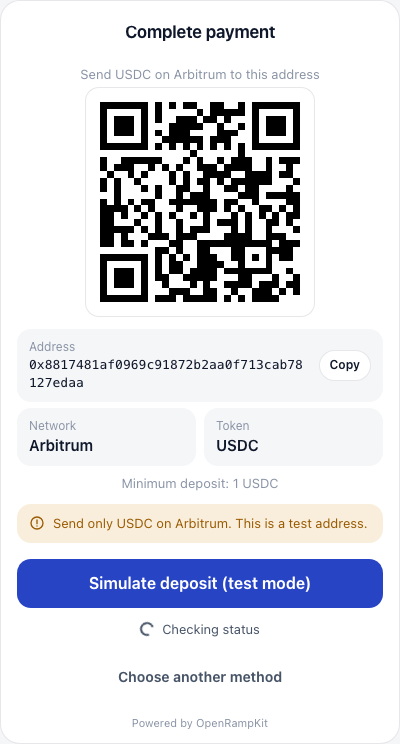
"Transfer crypto": the user sends tokens from any wallet or exchange.
- The modal shows "Send {symbol} on {chain} to this address", a QR code of the address, the address and memo with copy buttons, the network and the token, the minimum, and a warning. The default warning is "Send only {symbol} on {chain}. If you send another token or use another network, you can lose the funds."
WALLET_TX
{ kind: 'WALLET_TX'; chain: string; txs: TxRequest[] }
type TxRequest = EvmTxRequest | SolanaTxRequest
type EvmTxRequest = { kind?: 'evm'; to: string; data?: string; value?: string; chainId: number; gas?: string }
// SolanaTxRequest: { kind: 'solana', type: 'instructions' | 'transaction' | 'transfer', ... }
See Solana transactions in WALLET_TX for the Solana forms.
Transactions for the user's connected wallet to sign, in order (for example an approval, then a deposit).
WALLET_SIGN
{ kind: 'WALLET_SIGN'; chain: string; address: string; signatures: TypedDataRequest[] }
type TypedDataRequest = {
  domain: { name?: string; version?: string; chainId?: number; verifyingContract?: string; salt?: string }
  types: Record<string, Array<{ name: string; type: string }>> // without EIP712Domain
  primaryType: string
  message: Record<string, unknown>
}
Gas abstraction: EIP-712 messages for the connected wallet to sign, in order (eth_signTypedData_v4). The wallet sends no transaction, so it needs no native gas. address is the account that must sign. The UI calls signWalletMessages(). It signs with WalletAdapter.signTypedData(chain, data), then fires the transition that expects: 'signatures' with { signatures: string[] }. The server checks each signer before it uses a signature. See Relay: Gas abstraction.
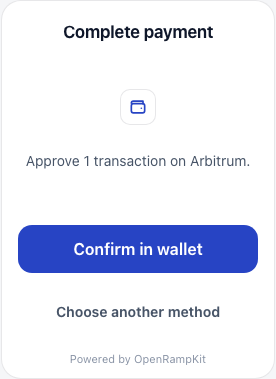
- The modal shows "Approve N transactions on {chain}." and a Confirm in wallet button. While the wallet is open, the button says "Check your wallet".
- On click,
DepositController.sendWalletTransactions()callswallet.sendTransactions(chain, txs)and fires the step'sSURFACE_RESULT(expects: 'tx_hash') transition with{ txHash }. See the wallet payment flow.
OTP
{ kind: 'OTP'; channel: 'email' | 'sms'; to: string }A one-time code. The modal shows "Enter the code we sent to {to}" and a code field (numeric keyboard, autocomplete="one-time-code"). The field id comes from the first SUBMIT transition's first input, or code. Submitting fires that transition with { [id]: value }.
FORM
{ kind: 'FORM'; fields: FieldSpec[] }
type FieldSpec = { id: string; label: string; type: 'text' | 'email' | 'tel' | 'number' | 'select' | 'checkbox';
                   required?: boolean; options?: Array<{ value: string; label: string }> }
A small form, for example extra details a provider needs. The first SUBMIT transition is the submit button. The values are sent as inputs keyed by field id.
No surface
A step without a surface (for example PROCESSING during a bridge hop) shows a spinner and the progress of each leg from session.payment.legs: "1. Test provider: done. 2. Relay: in progress".
Custom UIs
If you build your own UI on DepositController, pass the surfaces you can draw as surfaces in the controller options (or createDepositController). The server then plans only pathways your UI can finish.