Admin and observability
The server has small tools for operators:
- An admin API:
openramp.admin.*in your backend, and HTTP routes under{baseUrl}/admin/*. - An ops dashboard: one page at
GET {baseUrl}/admin. - A metrics callback:
telemetry.onMetric(name, value, tags).
Use them to find stuck sessions, look at legs and webhooks, close a session by hand, and send failed webhooks again.
Setup
const openramp = createOpenRamp({
  // ...
  admin: {
    token: process.env.OPENRAMP_ADMIN_TOKEN, // at least 32 random characters: openssl rand -hex 32
    stuckAfterMinutes: 60, // optional
  },
  telemetry: {
    onMetric(name, value, tags) {
      metrics.record(`openramp.${name}`, value, tags) // your metrics client
    },
  },
})| Option | Default | Description |
|---|---|---|
admin | none | Turns on the time index of sessions. openramp.admin.list, stats and findByTx need it. |
admin.token | none | Bearer token for the HTTP routes and the dashboard. At least 32 characters, else createOpenRamp throws. Without it, /admin and /admin/* answer 404. |
admin.stuckAfterMinutes | 60 | A session that is not final after this time counts as stuck. |
admin.indexDays | 8 | Days of the time index that list and stats read. The sweep removes older days. |
admin.page | true | false turns off the dashboard page. The JSON routes stay on. |
telemetry.onMetric | none | Called for each metric. See Metrics. |
openramp.admin.* works without admin.token. The token turns on the HTTP routes only.
Security
- Keep the admin token on the server. Store it as a platform secret. Do not put it in a client bundle, a URL or a log.
- The admin token is not the client secret and not
tasksToken. Use a different random value for each. - Put
{baseUrl}/adminbehind your own auth (SSO, an auth proxy) or a VPN in production. The token is a second lock, not the only one. - The server compares the token in constant time: it hashes both values and compares the two hashes.
- Admin answers have
cache-control: no-store. Admin routes never send CORS headers, also whencors.originsis'*'. - The dashboard page has no data in it. It asks for the token and keeps it in
sessionStorageof that tab only. Its Content Security Policy allows only its own inline script and style (with a nonce per request), requests to the same origin, and no framing by other sites. - The admin view of a session leaves out the secret hash, the start URLs, the stored quotes and the IP address.
- A resolve is an audit event: the note stays in the session record and goes to your backend in the webhook.
The dashboard
Open {baseUrl}/admin (for example https://app.example.com/api/openramp/admin) and enter the token.
- Stat cards for the last 24 hours: sessions, completed, open or processing, waiting for the user (
requires_action), stuck, failed, dead letters, webhook failures, outbox queue, deposits and withdrawals. Completed volume per currency. - A table of recent deposits and withdrawals, newest first, with filters (direction, state, stuck only) and "Load more".
- A search box: a session id, a transaction hash, or
provider:ref(for examplexendit:inv_123). - A detail drawer: the session data, the active payment and earlier attempts with their legs, the provider refs, the outbox and the timeline.
- Actions: "Replay webhooks" sends the dead letters again. "Resolve" sets a final state. It needs a note and a confirm step.
The page works in light and dark mode and at phone width. It loads no external scripts.
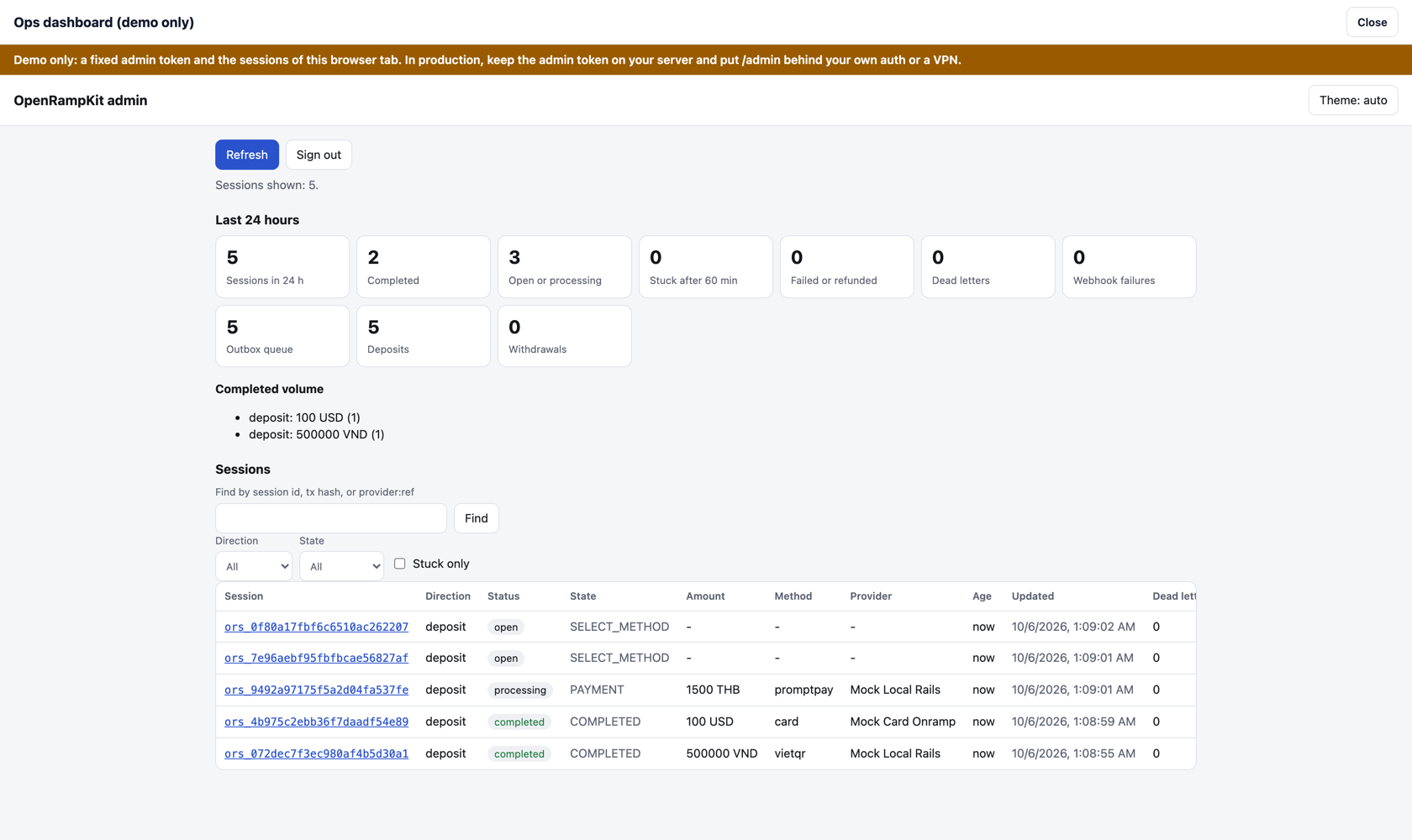
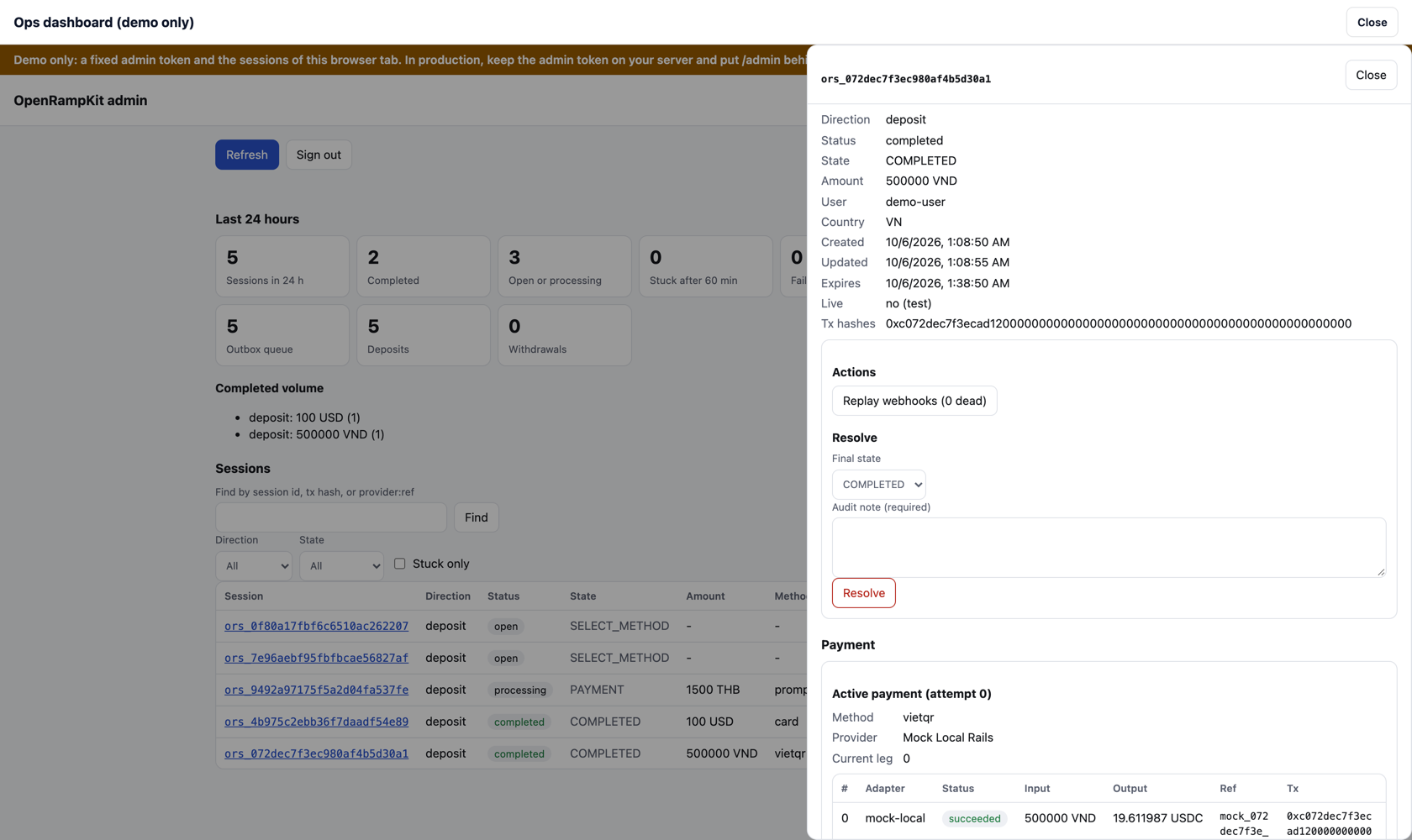
The playground shows the dashboard for the sessions in your browser tab: press "Open ops dashboard (demo)". It uses a fixed demo token. Do not do this in production.
Programmatic API
await openramp.admin.list({ direction?, state?, olderThan?, stuck?, limit?, cursor? })
// { sessions: AdminSessionSummary[], nextCursor?, scanned }
await openramp.admin.get(id)                 // AdminSession | null
await openramp.admin.findByRef(provider, ref) // AdminSession | null (provider = adapter id)
await openramp.admin.findByTx(chain, txHash)  // AdminSessionSummary[] (chain can be undefined)
await openramp.admin.stats({ since? })        // AdminStats
await openramp.admin.resolve(id, 'COMPLETED', 'Paid by bank transfer, ticket 123') // AdminSession
await openramp.admin.replayWebhooks(id)       // { queued: number }
await openramp.admin.providers()              // ProviderHealth[]
list
Recent sessions, newest first.
| Option | Description |
|---|---|
direction | 'deposit' or 'withdraw' |
state | A session status (requires_payment_method, requires_action, processing, succeeded, failed, canceled, expired, refunded, reversed) or a step state (PAYMENT, PROCESSING, ...) |
olderThan | Minutes. Only sessions created at least this long ago. |
stuck | Only sessions that are not final after admin.stuckAfterMinutes |
limit | 1 to 200, default 50 |
cursor | nextCursor of the previous page |
Each item has id, direction, status, state, amount, currency, method, provider, userId, livemode, createdAt, updatedAt, ageMs, stuck, deadLetters and resolved. The amount and currency are what the user pays in the active payment.
One call reads at most 1000 sessions. When it stops before the end, it returns nextCursor, also with fewer than limit items. Send the cursor to read on.
get
The full operator view: the summary fields, plus the user data, the destination or source, the step, the active payment and earlier attempts (each leg with its adapter, ref, providerRef, providerStatus, status, input, output, delivery, fees and transactions), the outbox (with dead letters), the provider refs, transactions (every transaction of every attempt, each with its role, chain, legIndex and attempt), the step (with step.detail), the timeline and the resolution.
The timeline keeps the last 100 events of a session: webhook event types (session.created, leg.succeeded, ...), leg status changes (leg.requires_action, leg.processing, ...), leg.transaction (a new transaction of a leg, with its role and hash), leg.provider_status (a new provider status), leg.delivery (a delivery that is not ok), payment.started, payment.restarted, webhook.dead_letter, webhook.replayed and admin.resolved.
findByRef and findByTx
findByRef(provider, ref) uses the provider reference index. The server keeps it 30 days.
findByTx(chain, txHash) has no index. It reads the time index (at most 1000 sessions in admin.indexDays) and compares the hash of each transaction, without case. It finds a transaction of any role (approval, source, hop, destination, settlement, refund) in any payment attempt. When you give chain, the transaction must be on that chain.
stats
Counts for the sessions created since since (a time in ms, an ISO 8601 string or a Date; default: 24 hours ago):
total,byStatus,byState, andbyDirection(total and statuses for deposits and withdrawals)succeededVolume: the sum that users paid in succeeded sessions, per direction and currencystuck: the count, the threshold, and the oldest stuck sessionoutbox:queued(sessions on the outbox queue now),pendingEvents,deadLetters,sessionsWithDeadLetterswebhookFailures: events with at least one failed deliveryopenQueue: sessions on the open-session list nowresolved: sessions that an operator resolved
One call reads at most 2000 sessions. Then truncated is true, and the counts cover the newest sessions only.
providers
Provider health per adapter: quote, start and leg counts in routing.healthWindowHours (default 24), the success rate that breaks ranking ties, the recent failure rate, and the circuit breaker state (closed, open or half_open). It needs no time index. See Provider health.
resolve
resolve(id, state, note) forces a final state: COMPLETED, FAILED, REFUNDED or EXPIRED. The note is required (1 to 500 characters).
The server:
- Sets the step state and the session status.
- Stores
resolution: { state, note, at, previous }in the record and addsadmin.resolvedto the timeline. - Sends the matching webhook:
session.succeeded,session.failed,session.refundedorsession.expired. The event data hasresolution: { by: 'admin', state, note, at }.
After a resolve:
- A later provider event still updates the legs (you see it in the drawer), but it does not change the session state, start a next leg or send from the treasury. One exception: a refund or a chargeback after success makes the session
REVERSEDand sendssession.reversed. - A payment on an earlier attempt that succeeds sends
session.late_payment. - The sweep does not poll the session for a late payment.
- Browser requests that change the session answer
409. - A resolve to the state that the session already has answers
409.
Your backend must handle a session.succeeded from a resolve like any other: credit once per session id.
replayWebhooks
The same as openramp.webhooks.replay(id): the dead letters of the session get a new retry window and are sent again. They keep their event ids.
HTTP routes
All need Authorization: Bearer {admin.token}, except the page. See HTTP routes.
| Method | Path | Does |
|---|---|---|
GET | /admin | The dashboard page |
GET | /admin/sessions?direction=&state=&olderThan=&stuck=1&limit=&cursor= | list |
GET | /admin/sessions/:id | get |
POST | /admin/sessions/:id/resolve | resolve. Body: { "state": "COMPLETED", "note": "..." } |
POST | /admin/sessions/:id/replay | replayWebhooks |
GET | /admin/stats?since= | stats |
GET | /admin/providers | providers. Answer: { "providers": [...] } |
GET | /admin/find?provider=&ref= or /admin/find?tx=&chain= | findByRef or findByTx. Answer: { "sessions": [...] } |
Metrics
telemetry.onMetric(name, value, tags) is a plain callback. Send the values to StatsD, Prometheus, Datadog or OpenTelemetry. The server ignores an error in the callback.
| Name | Value | Tags | When |
|---|---|---|---|
quote.latency_ms | ms | adapter, ok | Each adapter quote |
start.error | 1 | adapter, code | The first leg of a payment did not start |
payment.failover | 1 | from, to | A start failed with a provider error, and the server tries the next quote from adapter to |
breaker.opened | 1 | adapter | Too many recent quotes and starts of the adapter failed; quotes skip it |
breaker.closed | 1 | adapter | A probe quote worked after the cool-down |
quote.skipped | 1 | adapter, reason | A pathway was not quoted (reason: breaker) |
webhook.verify_failed | 1 | adapter | A provider webhook failed verification |
event.out_of_order | 1 | adapter | A provider event would move a leg back; the server ignored it |
leg.delivery_mismatch | 1 | adapter, status | A leg's delivery is not ok: short (less than minOutput, or beyond policy.outputToleranceBps), asset_mismatch or invalid |
payment.reversed | 1 | adapter, status | A provider refunded or charged back a leg after it succeeded |
webhook.replayed | 1 | adapter | A provider webhook with a replay key that the server saw in the last 7 days; ignored |
webhook.delivery_failed | 1 | status | A webhook to your backend failed (HTTP status, or error) |
webhook.dead_letter | 1 | type | An event stopped its retries |
outbox.depth | count | none | Each sweep: sessions on the outbox queue |
open_sessions.depth | count | none | Each sweep: sessions on the open-session list |
sweep.lag_ms | ms | none | Each sweep: time since the previous sweep started |
sweep.duration_ms | ms | none | Each sweep |
sessions.stuck | count | none | Each stats call |
Alert on a high sweep.lag_ms (the scheduler stopped), a growing outbox.depth, any webhook.dead_letter, webhook.verify_failed (a wrong provider secret or forged requests), and breaker.opened (a provider is down).
The time index and its limits
Stores have no queries. So, with admin set, the server puts each new session id on a day queue (admin-index:YYYY-MM-DD, UTC), with the creation time as the due time. It uses the store queues: a push is atomic in every built-in store, so sessions created at the same time are never lost. Nothing claims these queues. StoreQueue.range reads them, newest first.
Limits:
- Only sessions created after you set
adminare in the index. listandfindByTxread at most 1000 sessions per call, andstatsat most 2000. Each session is one store read.- The index covers
admin.indexDays(default 8). The built-in stores keep sessions 7 days. A session that the store dropped is skipped. - The sweep removes old index days (up to 2000 entries per run).
- A custom store with a
queuemust also haverange. Without it,list,statsandfindByTxanswer501. A custom store withoutqueueuses the record fallback, which hasrange. - Workers KV lists keys with a delay of up to a minute, so a new session can show late.
- For high volume or long reports, export the webhooks to your own database and query it there.